Overview
This project documents how I secured my personal WordPress site by reducing the default attack surface, enforcing browser security policies, and implementing a custom passkey-only login experience. Instead of relying on multiple generic security plugins, I built a security layer plugin to handle controls such as XML-RPC disablement, user enumeration protection, response headers, and Content Security Policy enforcement.
I also use Cloudflare at the edge to strengthen transport security with HTTPS enforcement, modern TLS settings, HSTS, and Zero Trust access control for administrative endpoints. The result was a layered setup that combined edge security, device and identity-aware administrative access control, application-level hardening, and browser-enforced protections while keeping the site maintainable through a separate child theme and custom security plugin.
The Problem
Running a public WordPress site safely takes more than turning on HTTPS and using a strong password. Out of the box, WordPress exposes more than I wanted on an internet-facing site, including common login paths, unnecessary endpoints, and platform details that make reconnaissance easier.
I wanted this site to be practical and secure. That meant reducing the default WordPress attack surface, adding stronger browser-enforced protections, and improving administrative authentication beyond a standard password workflow. Cloudflare was an important part of that, but edge protection alone was not enough. I also wanted the application itself to be more defensive.
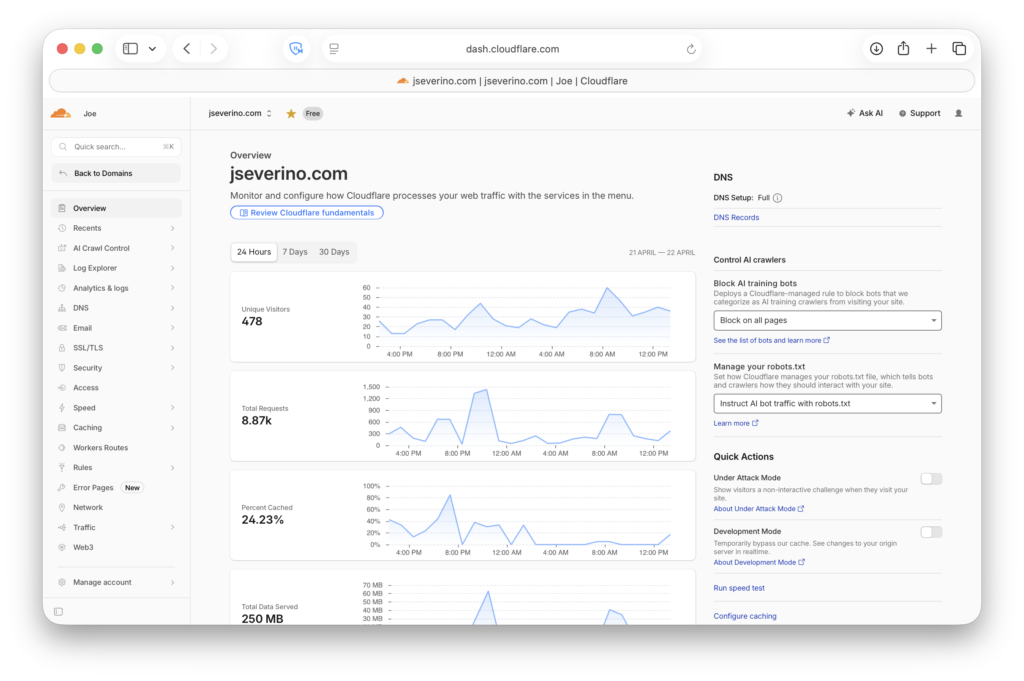
Passkeys were a major part of that goal. I wanted a cleaner, stronger login experience that eliminated reliance on the traditional username and password. But implementing that in WordPress was not as simple as installing a plugin and moving on. During setup, the WebAuthn flow introduced a real troubleshooting issue that had to be resolved before passkey registration worked correctly.
This project came out of that full problem set: hardening a public WordPress site at the edge, in the application, and at the authentication layer while keeping the environment manageable day to day.
Edge Security with Cloudflare
Cloudflare sits in front of the site as the public-facing edge layer, which means web traffic reaches Cloudflare before it reaches the WordPress origin. That gives me a cleaner perimeter to manage and lets core DNS and transport controls live at the edge rather than relying on WordPress alone.
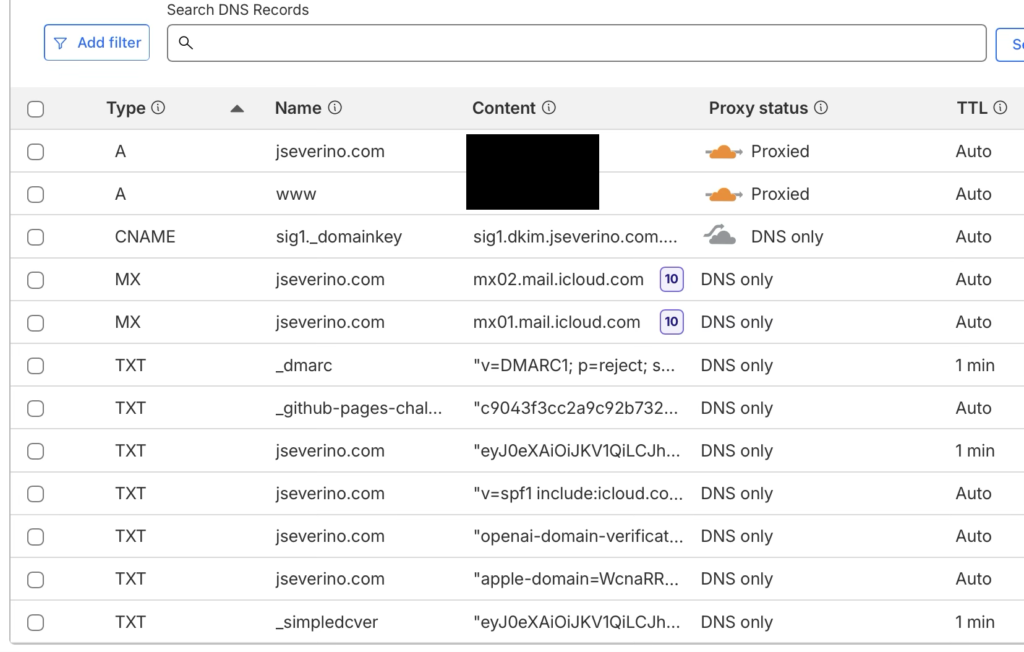
Cloudflare also secures the site’s DNS layer with DNSSEC, adding signed DNS responses on top of the proxied records and domain-level email authentication controls.
That edge role is not limited to DNS. Cloudflare also enforces how browsers connect to the site, which is where transport security becomes more meaningful than simply having HTTPS available. Instead of only serving the site over TLS, I configure the edge to require modern HTTPS behavior, including TLS 1.3 and browser-facing policy that treats HTTPS as the normal and expected path.
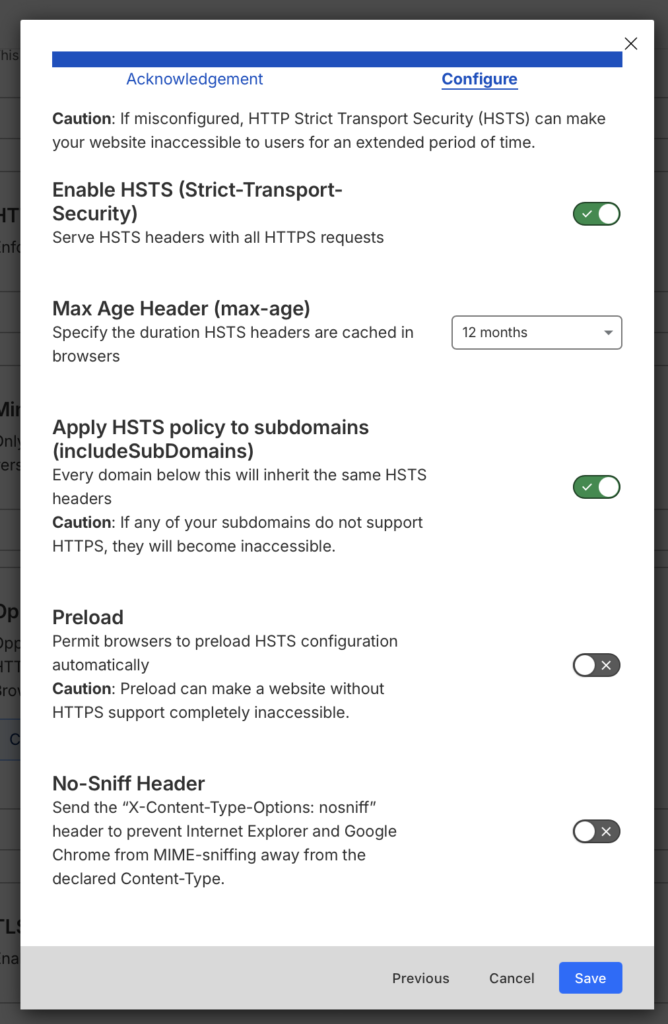
In this configuration, HSTS is enabled with a one-year max-age and the policy is extended to subdomains through includeSubDomains. That means supported browsers are instructed to continue using HTTPS for the domain and its subdomains once they have seen the policy. I leave preload disabled, which keeps the site off browser preload lists while still enforcing strict transport behavior after the first secure visit.
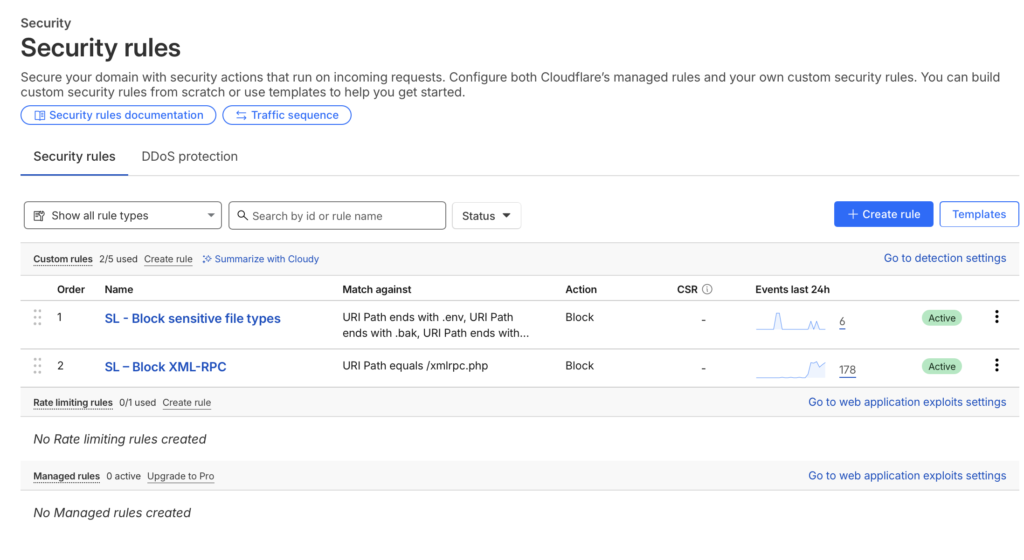
I also added targeted Cloudflare custom rules for high-noise WordPress and file exposure probes. XML-RPC requests and sensitive file patterns such as .env, .log, .bak, and .sql are blocked at the edge, reducing unnecessary traffic to the origin and keeping those requests out of the WordPress application layer.
I also added a direct-origin protection control so the site is not only relying on Cloudflare’s proxy behavior. Cloudflare injects a private request header containing a locally generated random hex value from openssl rand -hex 32 on origin-bound traffic, and a .htaccess rule at the web root requires that header before allowing the request to continue.
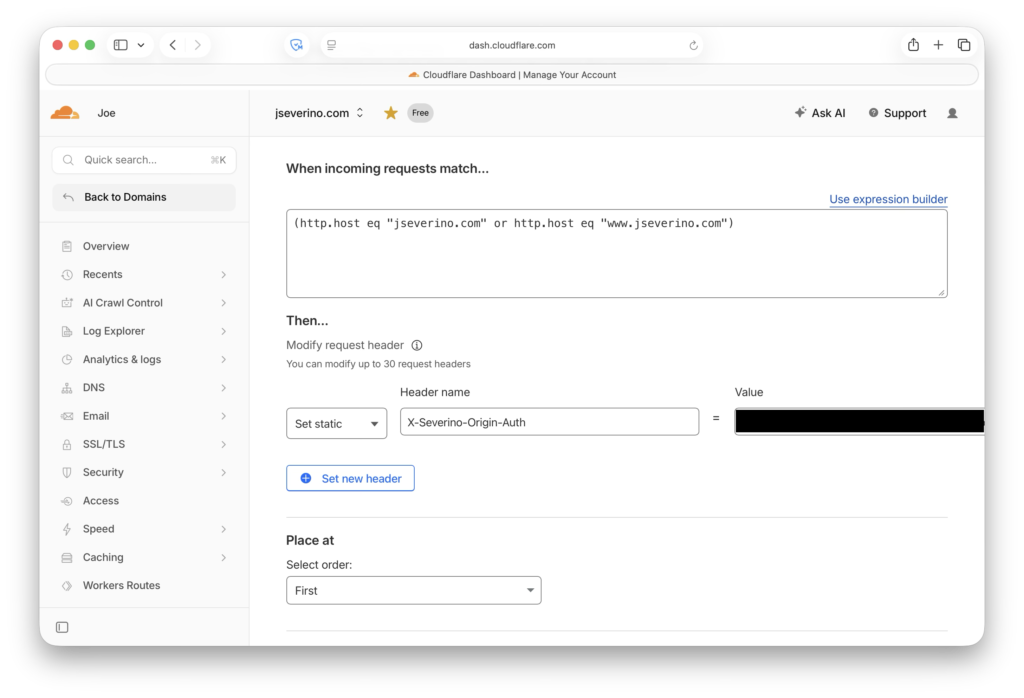
At the web root, the .htaccess rule blocks requests when the private Cloudflare-injected request header is missing or does not match the expected value.
RewriteCond %{HTTP:X-Severino-Origin-Auth} !^REDACTED_RANDOM_HEX_VALUE$
RewriteRule ^ - [F,L]
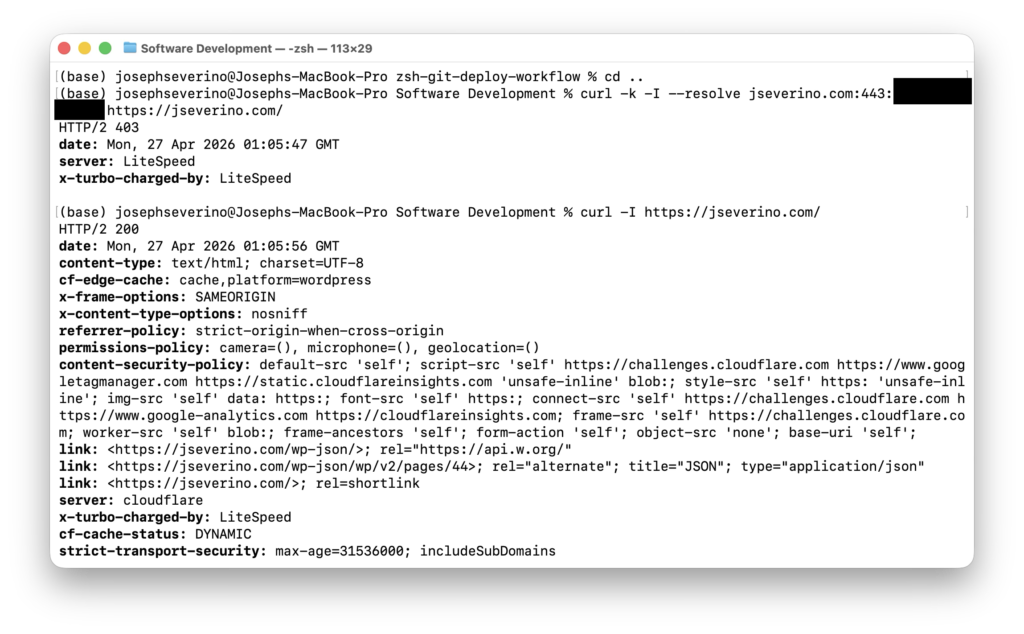
This creates a simple origin trust boundary. Normal visitors reach the site through Cloudflare, the private header is added before the request reaches the origin, and the origin serves the page. If someone connects directly to the origin IP, the header is missing and the request is rejected with a 403 Forbidden response.
I validated the control from the terminal by testing both paths. A direct request to the origin IP returned 403 Forbidden, while a normal request through the Cloudflare-proxied hostname returned 200 OK.
This strengthens the site’s internet-facing boundary, but it does not harden WordPress by itself. Cloudflare improves the edge and transport layer; the WordPress attack surface, browser security headers beyond this setting, and authentication controls still need to be handled separately inside the stack.
Building a Custom WordPress Security Layer Plugin
Instead of relying on a third-party security plugin to handle core hardening decisions for me, I built my own WordPress security layer as a custom plugin. That gives me direct control over what the site does and does not expose, which matters more to me than installing a large security suite and accepting its defaults, feature set, and overhead.
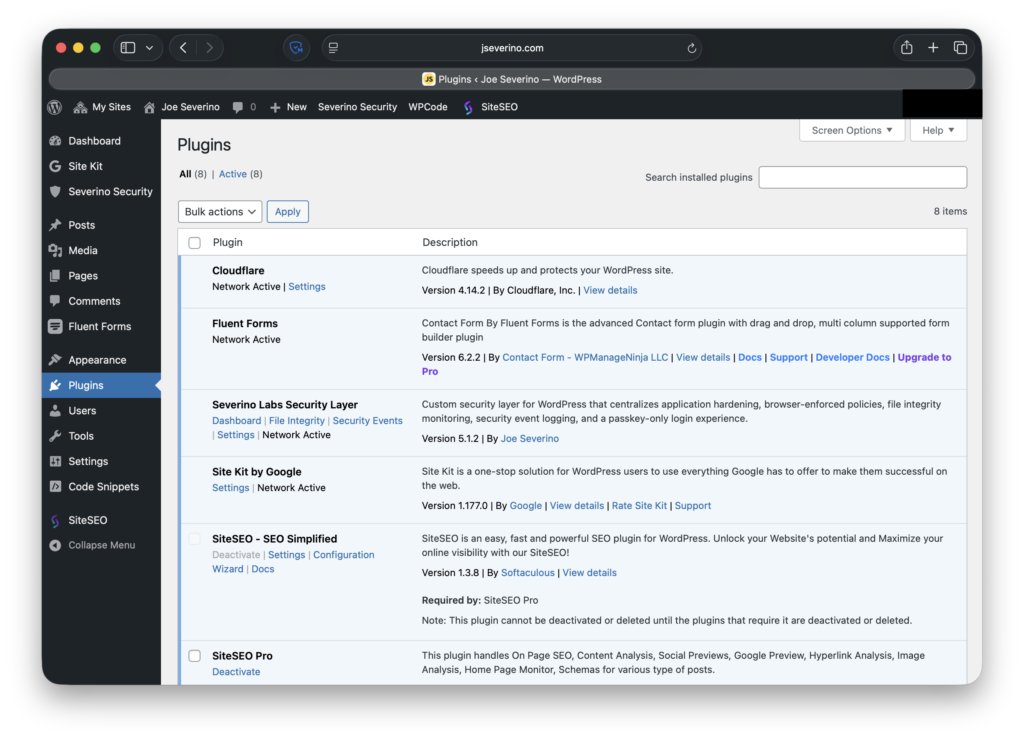
For this site, I want the application-side hardening to be explicit and understandable. A custom plugin lets me define that behavior myself: disabling XML-RPC, reducing user enumeration paths, removing the public WordPress version signal, sending browser security headers, and shaping the login experience around passkeys. Rather than spreading those controls across theme files, snippets, and multiple plugin settings pages, I keep them in one maintained layer that I fully understand.
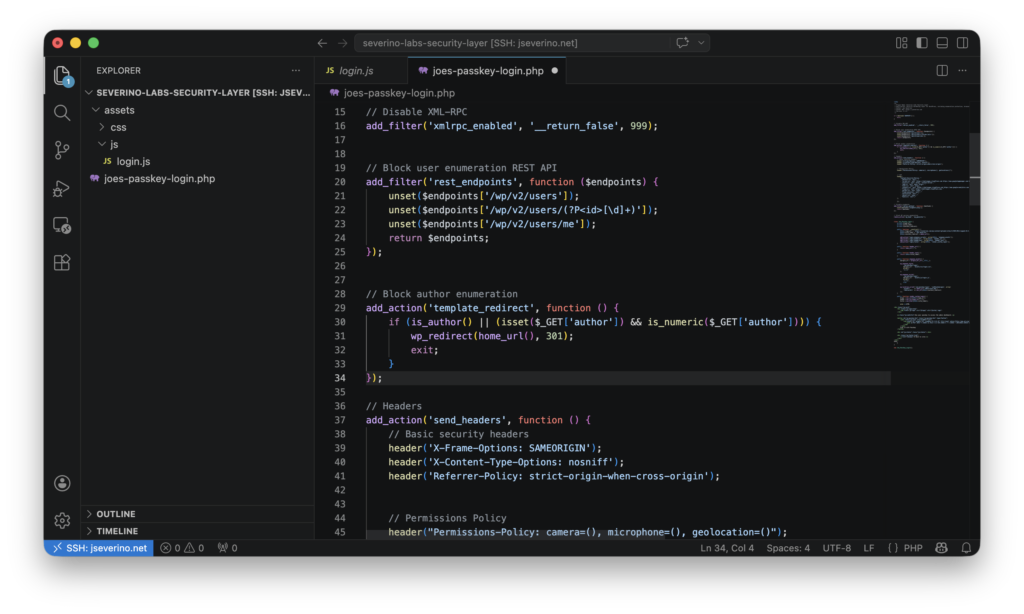
That approach also keeps the security model narrower and more intentional. Third-party security plugins often bundle large numbers of features, but I do not need a generic all-in-one toolbox deciding how this site behaves. I need a focused control layer built around the actual risks and requirements of my environment. Writing that logic myself keeps the behavior predictable and makes it easier to audit, update, and explain.
In practice, this plugin becomes the WordPress-side counterpart to Cloudflare. Cloudflare handles the edge, while the custom plugin handles application-layer hardening inside WordPress itself. The sections that follow break down the controls it manages in more detail.
Reducing the Default WordPress Attack Surface
WordPress exposes more than I want by default on a public-facing site. Some of that exposure is not necessary for this environment, especially when the goal is to reduce reconnaissance value and remove features that do not need to be available at all. In the custom security plugin, I use a small set of targeted controls to cut back that default surface rather than leaving WordPress in its out-of-the-box state.
One example is XML-RPC, which I disable entirely because I do not need it for this site. WordPress also supports pingback-related XML-RPC methods, which have historically been abused and provide no practical value here, so those are removed as well.
add_filter('xmlrpc_enabled', '__return_false', 999);

add_filter('xmlrpc_methods', function ($methods) {
    unset($methods['pingback.ping']);
    return $methods;
});
Note: The code shown here reflects the plugin’s earlier hardening-focused implementation. The live plugin has since evolved into a broader security layer with configurable settings, file integrity monitoring, security event logging, and dedicated admin screens.
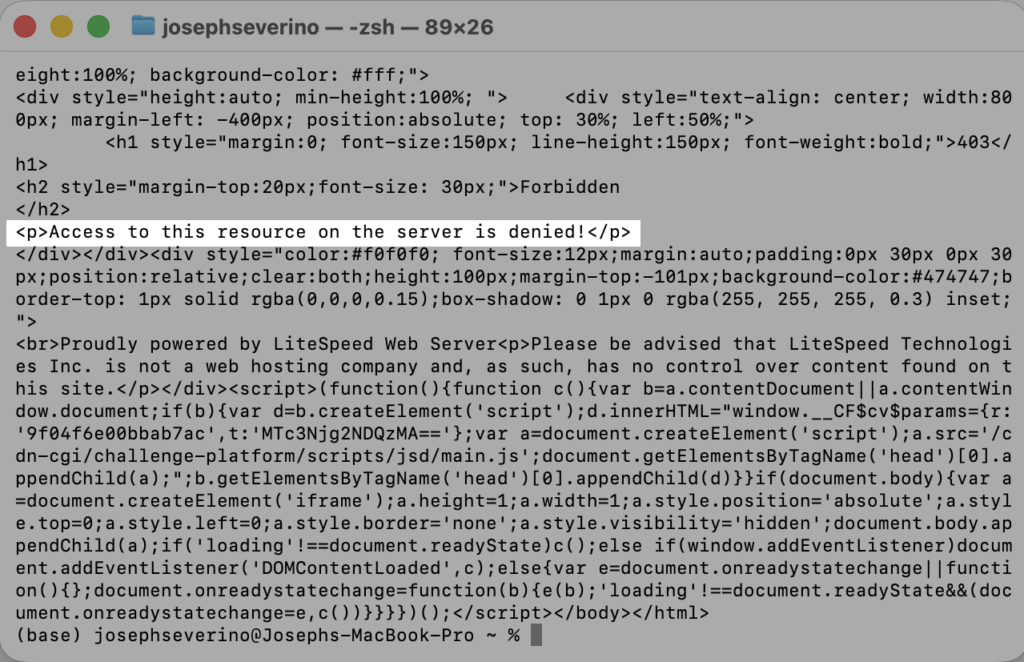
I also reduce user enumeration paths that can expose account-related information more easily than necessary. In particular, I remove the default REST API user endpoints and redirect author archive enumeration attempts back to the home page.
add_filter('rest_endpoints', function ($endpoints) {
    unset($endpoints['/wp/v2/users']);
    unset($endpoints['/wp/v2/users/(?P<id>[\d]+)']);
    unset($endpoints['/wp/v2/users/me']);
    return $endpoints;
});
add_action('template_redirect', function () {
    if (is_author() || (isset($_GET['author']) && is_numeric($_GET['author']))) {
        wp_redirect(home_url(), 301);
        exit;
    }
});
Finally, I remove the public WordPress version signal from the page header so the site does not advertise that detail by default. That matters because version enumeration can directly support exploit selection, which I also demonstrated in my PHP CGI argument injection lab.
remove_action('wp_head', 'wp_generator');Browser-Enforced Security Policies
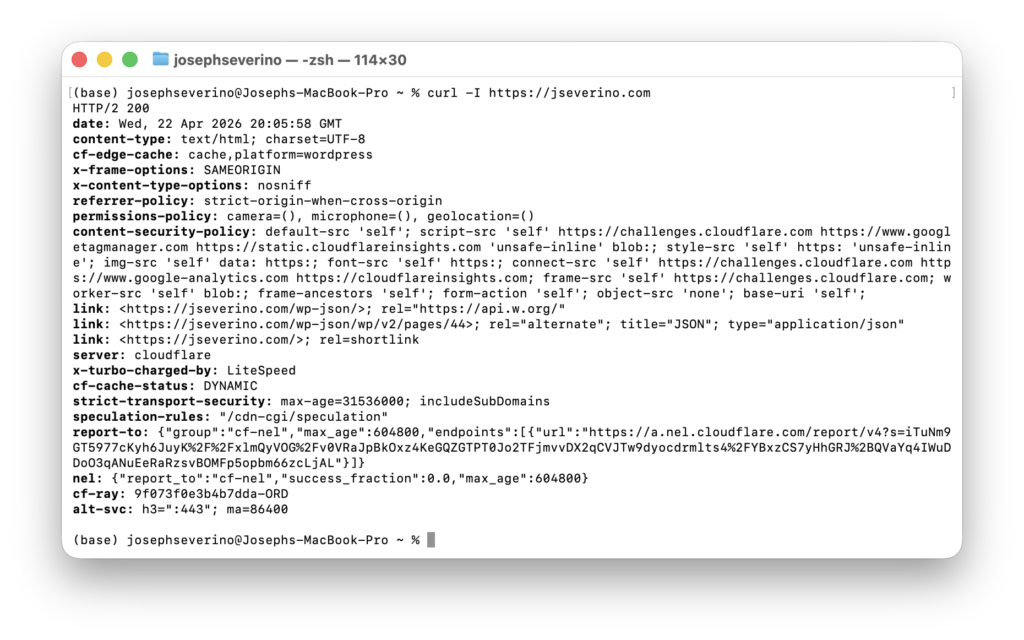
Not every meaningful security control lives in authentication or server-side request handling. Browsers also enforce policy on the client side, which makes response headers an important part of the site’s security model. In the custom plugin, I send a set of browser-facing headers that limit framing behavior, reduce content-type ambiguity, control referrer leakage, restrict access to sensitive browser features, and define a Content Security Policy for what the page is allowed to load.
One part of that layer is a set of baseline headers that tighten browser behavior without affecting normal site use. I use X-Frame-Options to limit framing to the same origin, X-Content-Type-Options to disable MIME sniffing, and Referrer-Policy to reduce how much origin information is shared across requests. I also send a Permissions-Policy that disables browser access to the camera, microphone, and geolocation APIs for this site.
header('X-Frame-Options: SAMEORIGIN');
header('X-Content-Type-Options: nosniff');
header('Referrer-Policy: strict-origin-when-cross-origin');
header("Permissions-Policy: camera=(), microphone=(), geolocation=()");
The most opinionated control in this layer is the Content Security Policy. Rather than letting the browser load active content from anywhere, I define a policy that defaults to the site itself and then explicitly allow only the sources required for the site’s actual functionality. In this case, that includes Cloudflare challenge resources, Google Tag Manager, Cloudflare analytics resources, and tightly scoped directives for scripts, styles, images, fonts, connections, frames, workers, and form handling.
header(
    "Content-Security-Policy: "
    . "default-src 'self'; "
    . "script-src 'self' https://challenges.cloudflare.com https://www.googletagmanager.com https://static.cloudflareinsights.com 'unsafe-inline' blob:; "
    . "style-src 'self' https: 'unsafe-inline'; "
    . "img-src 'self' data: https:; "
    . "font-src 'self' https:; "
    . "connect-src 'self' https://challenges.cloudflare.com https://www.google-analytics.com https://cloudflareinsights.com; "
    . "frame-src 'self' https://challenges.cloudflare.com; "
    . "worker-src 'self' blob:; "
    . "frame-ancestors 'self'; "
    . "form-action 'self'; "
    . "object-src 'none'; "
    . "base-uri 'self';"
);
That policy is intentionally practical rather than theoretical. It is strict enough to reduce unnecessary resource loading and limit common abuse paths, but it still allows the services the site actually uses. The goal is not to publish a decorative CSP that breaks real functionality; the goal is to enforce a policy that reflects the site’s real dependencies and keeps the browser on a shorter leash by default.
Hardening Administrative Access
Hardening a public site is not only about filtering traffic and reducing exposed features. It also means protecting the interfaces that can administer the environment in the first place. For this site, that includes the WordPress admin login, the hosting control panel, and direct server access over SSH.
At the WordPress layer, administrative access is restricted to a passkey-only login flow rather than a traditional password-based sign-in. That removes the default password-first model from the dashboard entry point and strengthens access to wp-admin beyond a standard WordPress setup.
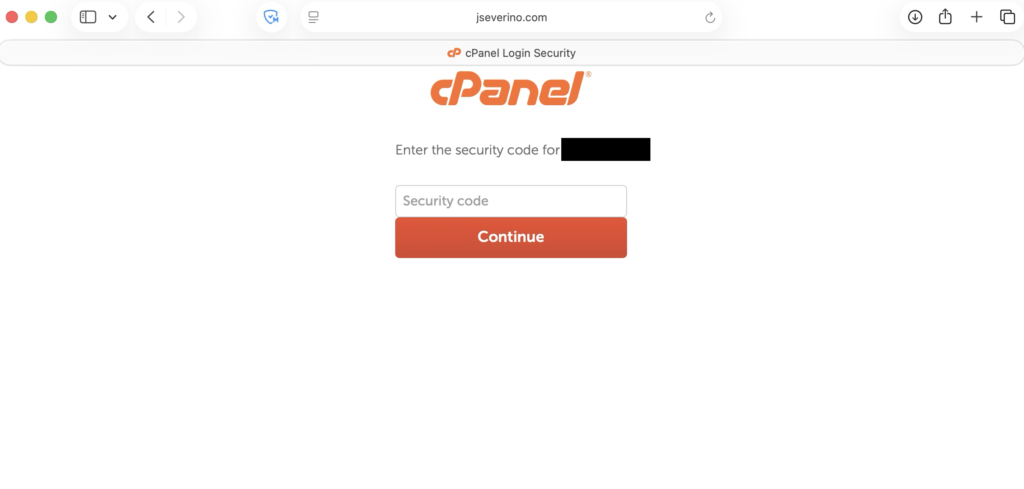
The hosting account is also treated as a critical control point because access there reaches far beyond WordPress itself. cPanel can affect files, databases, email, and domain configuration, so I protect it with a strong unique password and two-factor authentication rather than treating it like a secondary admin surface.
For direct management access, I also use SSH key-based authentication on the hosting server instead of relying only on browser-based administration. Access is tied to an RSA 4096 key pair, which gives me a more controlled path for maintaining the environment directly when needed.
Together, these controls harden the main administrative paths into the environment rather than focusing only on public-facing traffic. Edge protections, WordPress hardening, and administrative access controls each solve different parts of the same security problem.
Enforcing Zero Trust Access on Administrative Endpoints
Protecting administrative access is not only about how users authenticate, but also whether they can reach the login interface at all. Even with a passkey-only WordPress login, the default administrative path is still publicly reachable unless it is explicitly restricted.
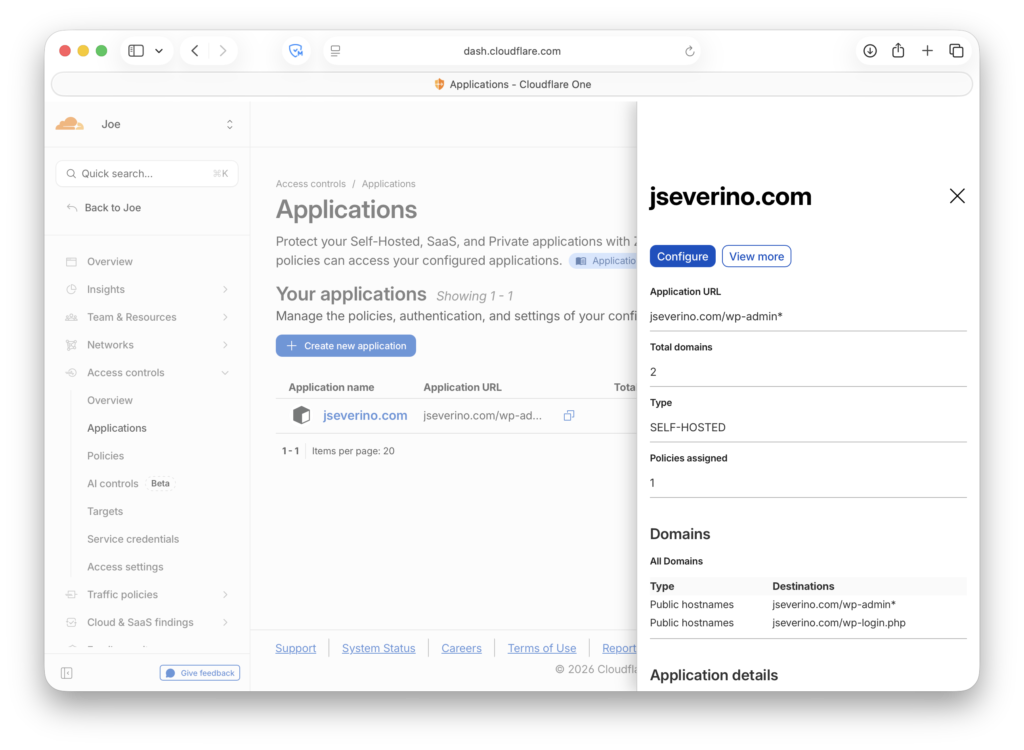
To reduce that exposure, I placed the WordPress administrative endpoint behind Cloudflare Access. This moves access control out of the application and into the edge, where requests can be evaluated before they ever reach WordPress.
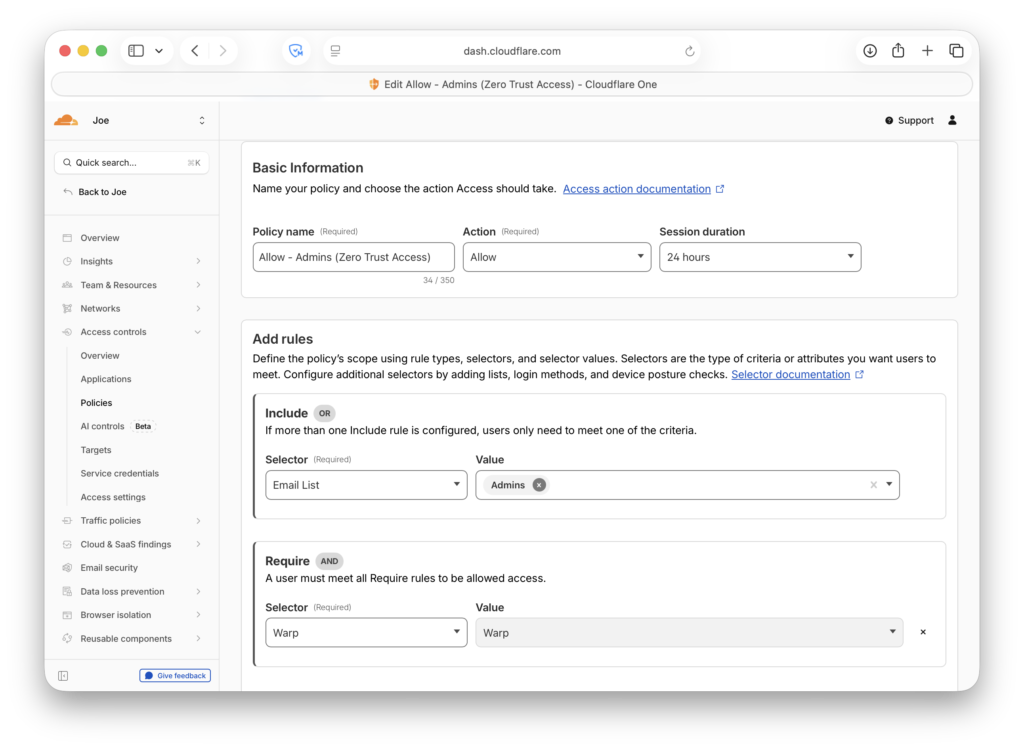
I configured an access policy that requires both identity and device posture. In practice, that means access is only allowed if the user belongs to my administrative access list and the device is presenting the expected Cloudflare client posture signal.
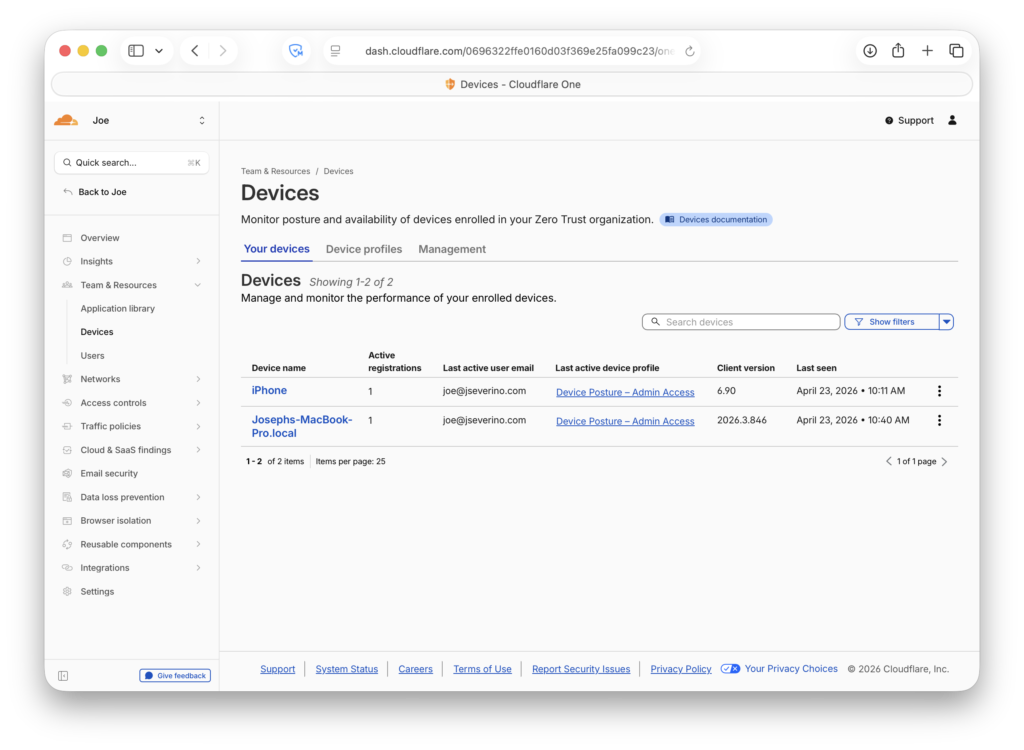
Enrolled devices are registered with Cloudflare Zero Trust and associated with the administrative posture profile used in access policy evaluation.
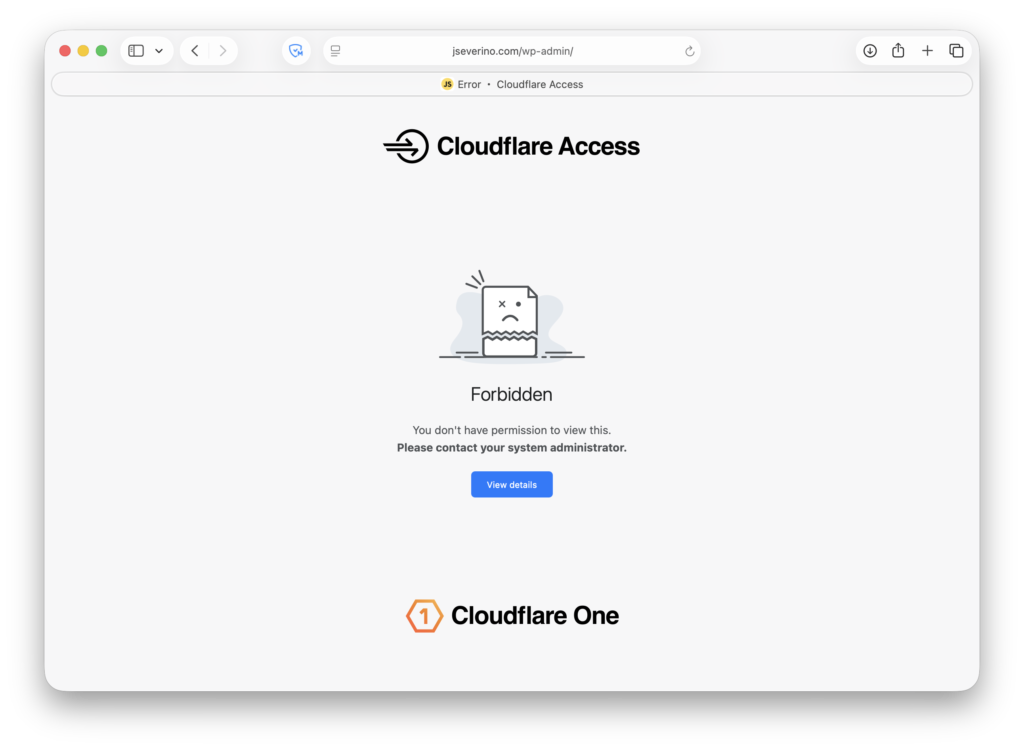
This changes the exposure model of wp-admin. Instead of presenting the login interface to any internet client, the request is first evaluated by Cloudflare at the edge. If the request does not satisfy the policy, WordPress is never reached and the login flow is never exposed.
That layered design matters because it separates two different security decisions. Cloudflare Access determines whether a request is permitted to reach the administrative surface at all, while WordPress passkeys determine how the user authenticates once access to that surface is allowed.
When device posture is missing or the request does not satisfy policy, Cloudflare blocks the request at the edge with a 403 Forbidden response. That means unauthenticated or untrusted devices are stopped before they can interact with WordPress.
In a production environment, this same model could be extended with stronger posture controls such as minimum operating system version, disk encryption, or endpoint protection requirements. For this implementation, I used the Cloudflare client as a practical device trust signal that materially reduces exposure without changing the WordPress application itself.
Building a Passkey-Only Login Experience
The custom login experience is also part of the Severino Labs Security Layer plugin. Instead of treating authentication as a separate add-on, I keep the login behavior inside the same custom hardening layer that manages the rest of the site’s WordPress-side security controls.
In this case, the plugin does more than restyle the default WordPress login page. It replaces the normal username-and-password experience with a passkey-only interface and forces administrative authentication through that path. The result is not a mixed login model with passkeys added as a convenience feature; it is a login flow built specifically around passkey authentication.
Because passkey registration is disabled, this setup does not allow new credentials to be enrolled through the public-facing login experience. In practice, that means the passkey-enabled administrative path is limited to the credential I already provisioned rather than being open for ongoing self-registration.
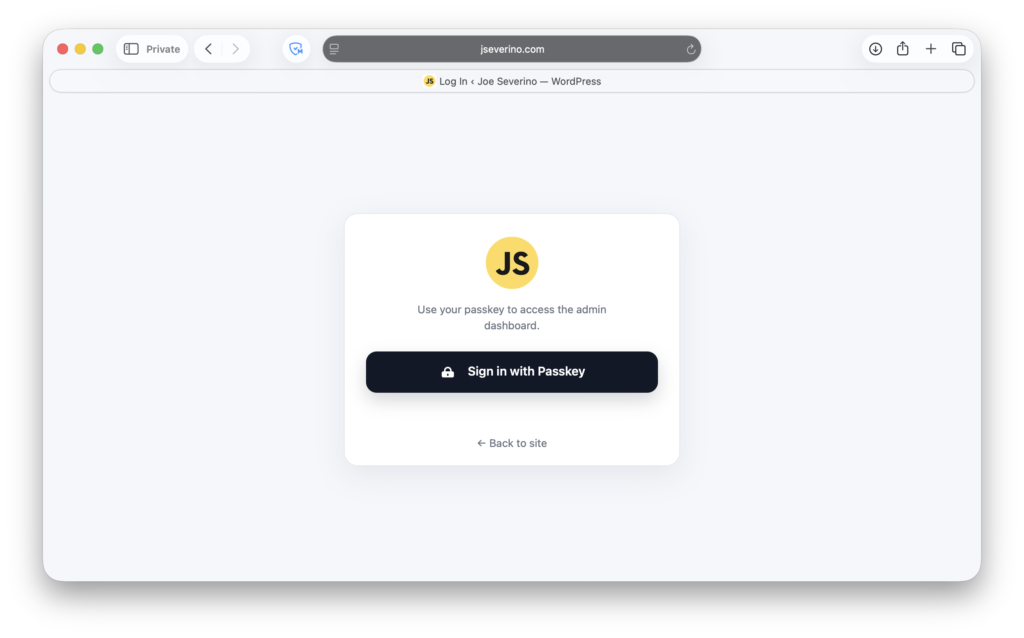
That design keeps the login experience aligned with the actual access model. The interface is simplified to a single action, the default password workflow is removed from view, and the administrative entry point reflects the stronger authentication policy enforced behind it. Rather than layering passkeys on top of the stock WordPress login page, the plugin makes passkey-only access the expected and explicit behavior.
Debugging WP-WebAuthn Passkey Creation
The hardest part of the passkey setup was not the login interface itself. It was getting WP-WebAuthn to actually save a newly registered passkey. During testing, the plugin reported that registration was successful, but no credential was being stored in the list.
To verify what was happening, I checked the browser’s network activity during passkey registration. The request returned an HTTP 200 response, which made the issue harder to spot at first because the flow appeared successful on the surface even though nothing was actually being saved.

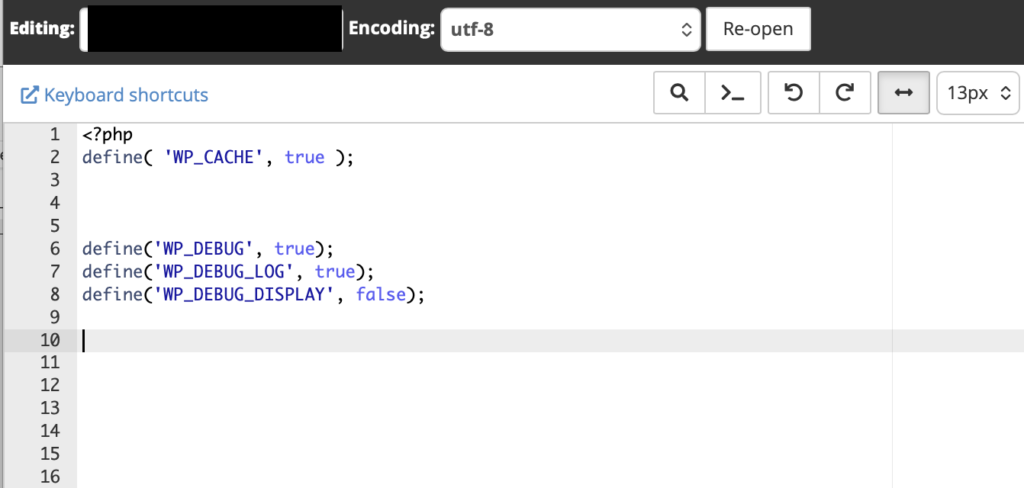
That pushed me into WordPress-side debugging. I enabled debug logging in wp-config.php, which exposed the real failure: the plugin was trying to write to a database table that did not exist.
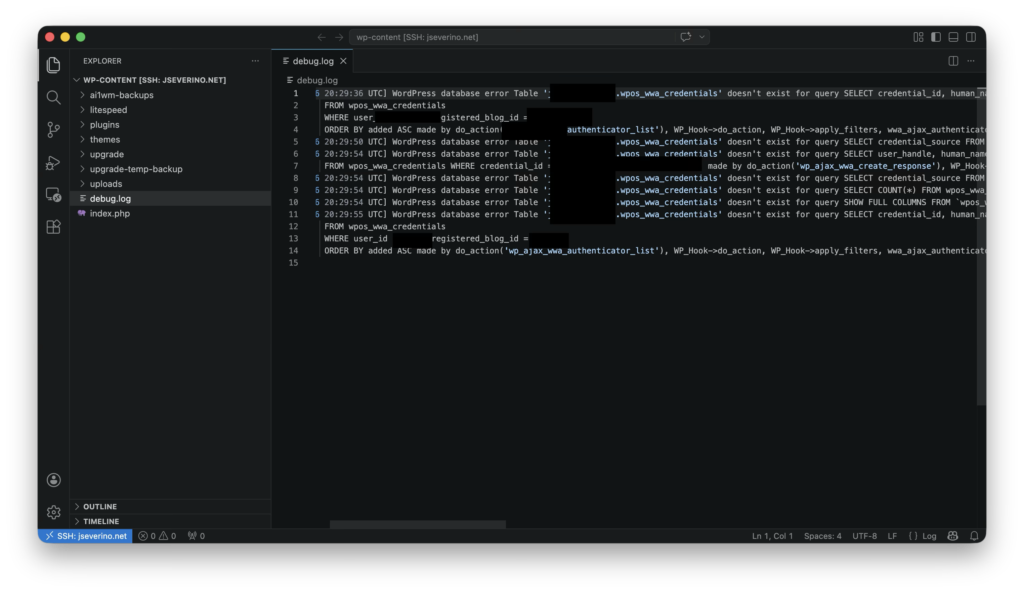
After that, I checked the plugin code to confirm which table WP-WebAuthn expected to use, then created the missing table manually in phpMyAdmin.
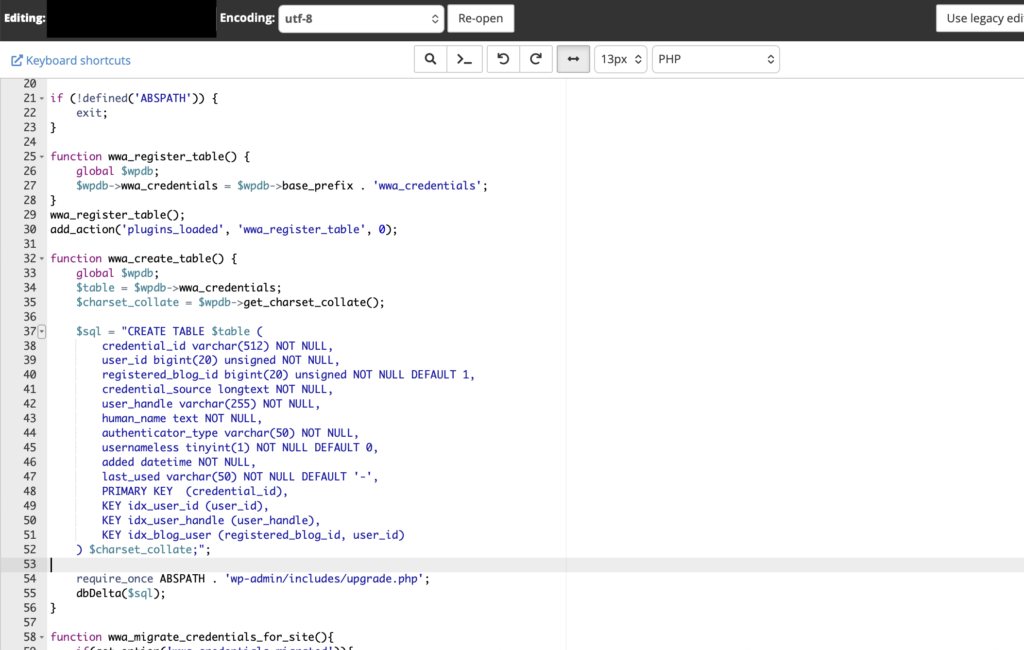
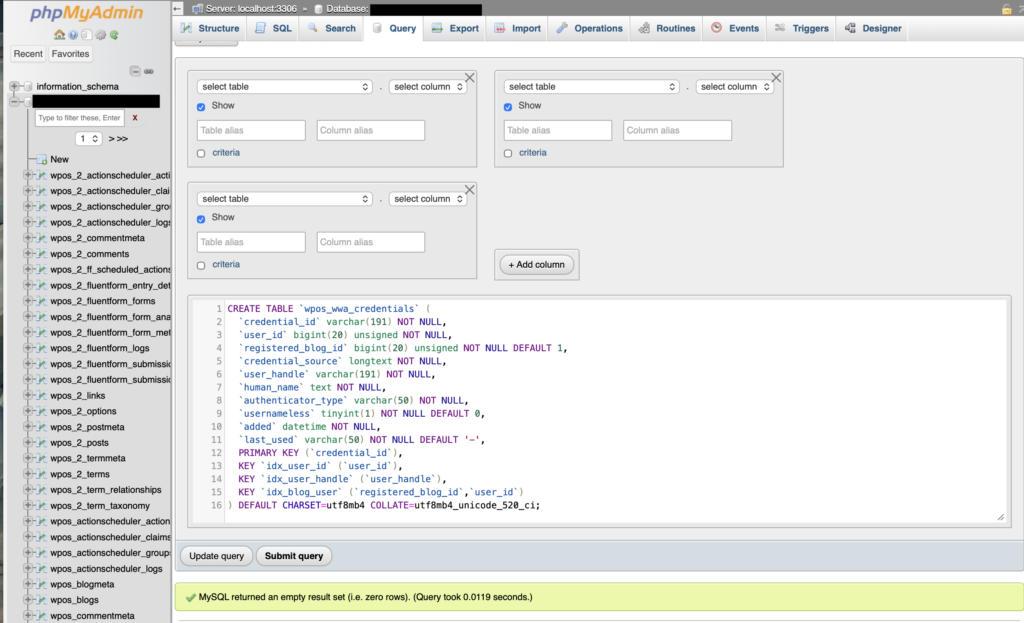
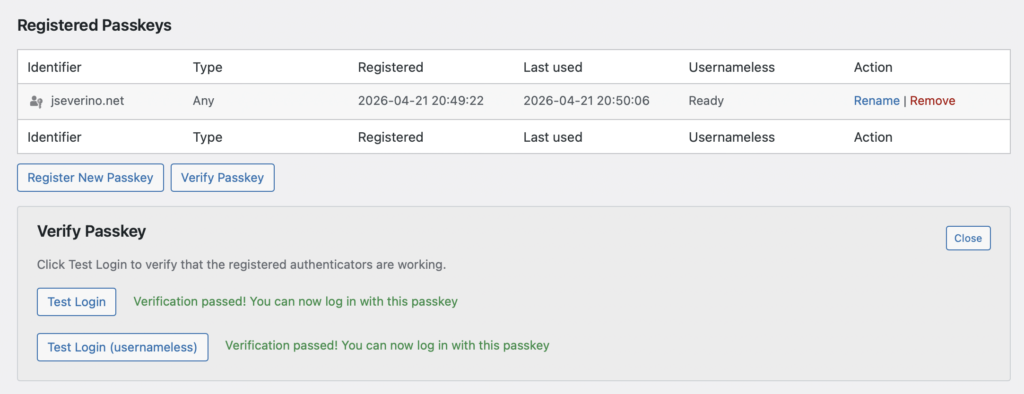
With the table in place, registration finally worked and the passkey was saved correctly.
Child Theme and Maintainability
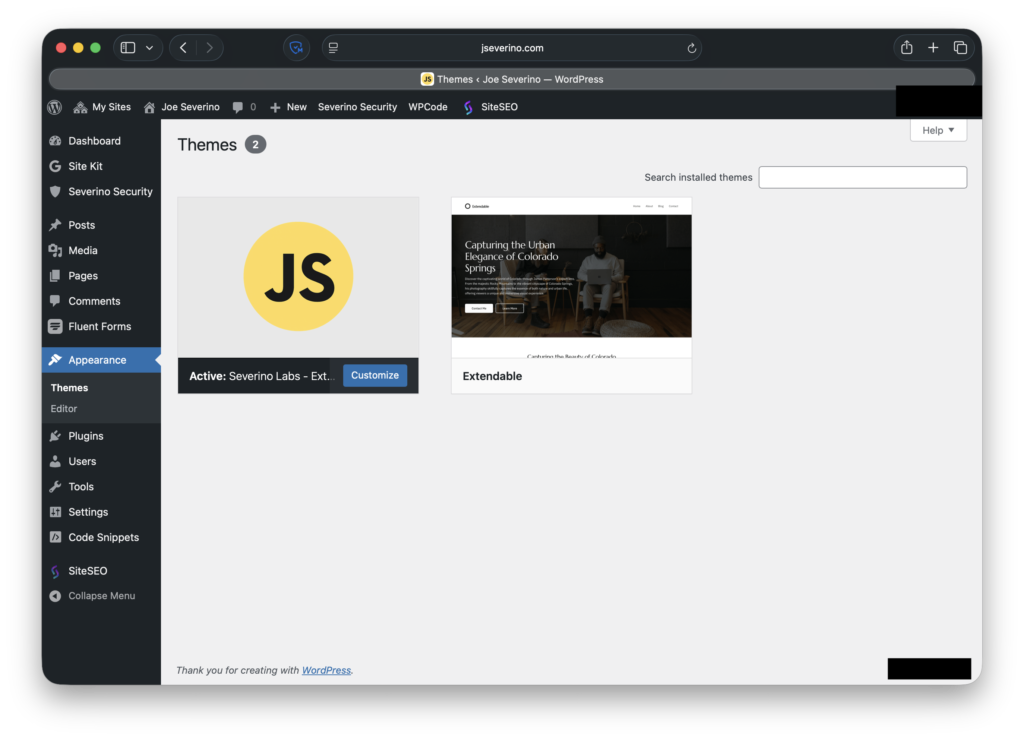
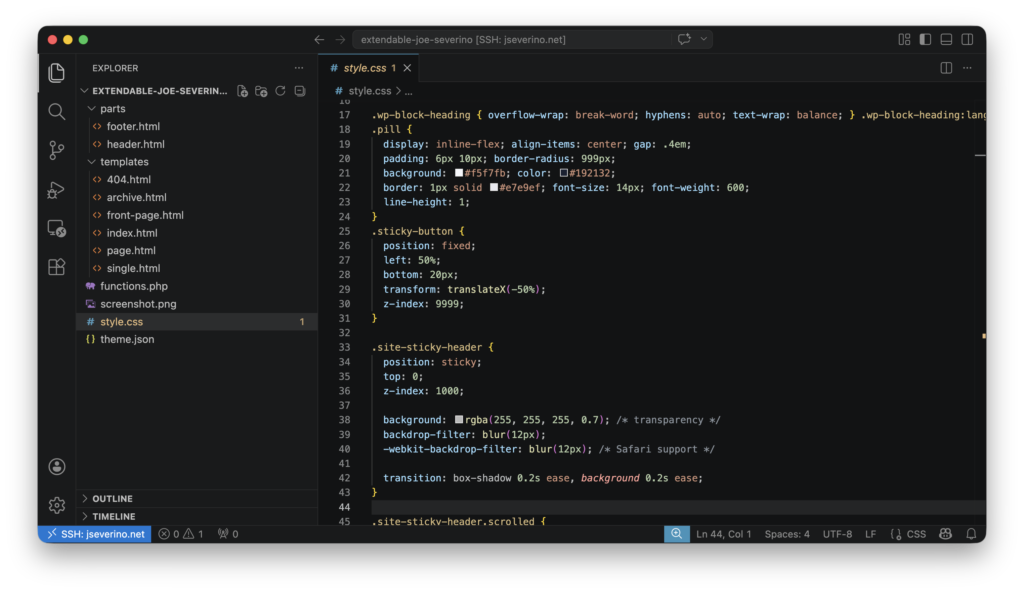
I also keep the site’s presentation-layer customizations in a child theme so they stay separate from both the parent theme and the Severino Labs Security Layer plugin. That separation makes updates easier to manage and keeps responsibilities cleaner: the child theme handles site-specific design and template changes, while the custom plugin handles security and authentication logic.
Validation and Testing
After implementing the controls, I validated them against the live site instead of assuming the configuration alone was enough. That included confirming that security headers were being returned, that unnecessary WordPress exposure had been reduced, and that the passkey registration and login flow worked correctly once the WP-WebAuthn persistence issue was fixed.
I also used external validation to confirm that those controls were visible from outside the environment. That gave me a direct way to check that the hardening work was not just present in code, but active in the site’s real public-facing behavior.
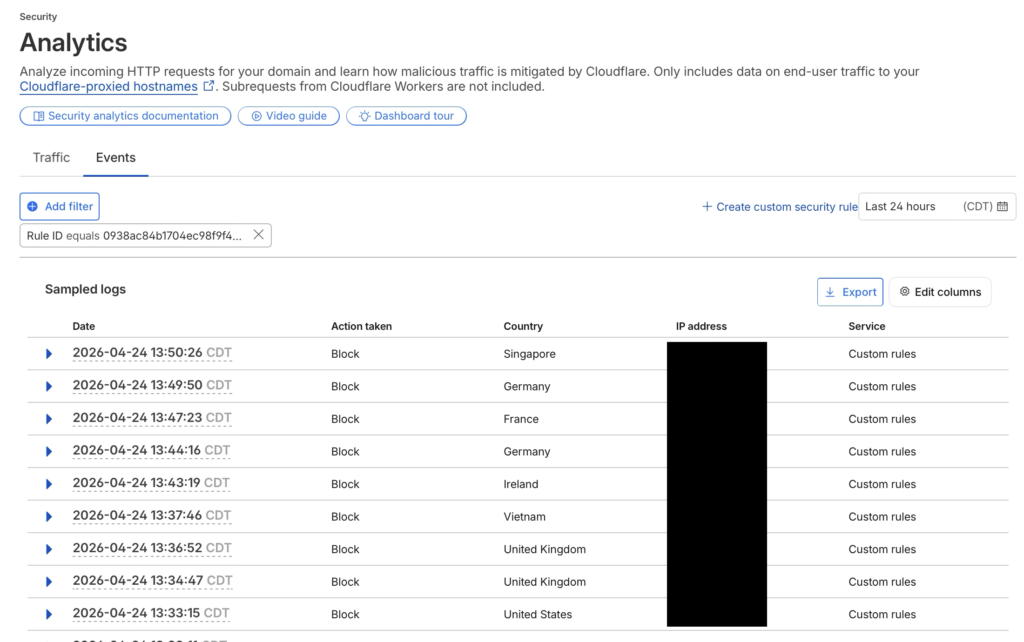
I also checked Cloudflare Security Events after enabling the custom rules. The logs showed blocked requests from multiple countries within a short period, which is consistent with broad automated scanning rather than normal visitor behavior. This confirmed that the rules were actively filtering XML-RPC and sensitive file probing before those requests reached the WordPress origin.
Tradeoffs and Practical Constraints
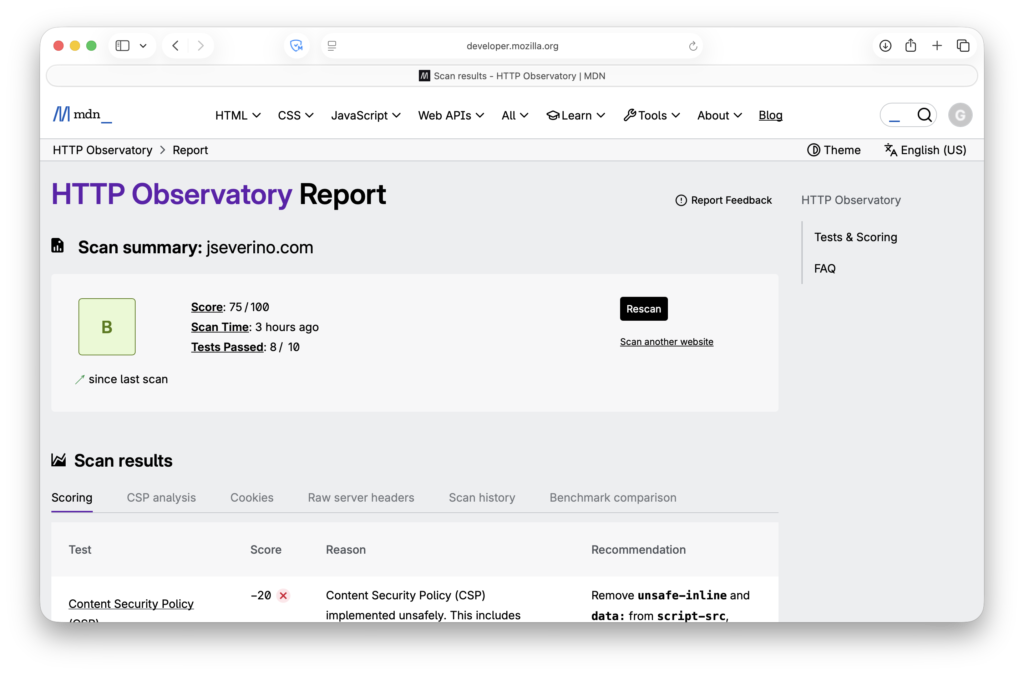
This setup is intentionally practical rather than scanner-perfect. Mozilla Observatory gives the site a B (75/100), with the main deductions coming from the current Content Security Policy, missing Subresource Integrity, and the lack of Cross-Origin-Resource-Policy.
Those findings are useful, but I do not treat every recommendation as something to force immediately. The current policy still has to support the site’s real dependencies, and some stricter settings would require further front-end cleanup before they could be applied safely. I also leave HSTS preload disabled intentionally rather than enabling it just to improve a report.
For this site, the goal is a security configuration that is stronger, controlled, and maintainable in the live environment, not one that looks perfect in a scan while introducing unnecessary breakage.
Conclusion
Securing this WordPress site ended up being more than a matter of turning on HTTPS or installing a few plugins. The final setup combines Cloudflare at the edge, a custom WordPress security plugin inside the application, reduced default WordPress exposure, browser-enforced security headers, hardened administrative access, and a passkey-only login experience.
Just as important, the project stayed practical. Instead of stacking generic tools and hoping they worked well together, I built a smaller and more controlled hardening layer around the site’s actual requirements. That included debugging WP-WebAuthn when passkey registration failed, separating security logic from presentation concerns, and validating that the controls were active in the live environment.
The result is a WordPress deployment that is materially stronger than the default setup while still remaining understandable, maintainable, and tailored to how the site is actually run.
Future Goals
A future project I want to explore is sso.jseverino.net as a centralized authentication layer for my personal sites. The goal would be to unify access across environments like jseverino.com and jseverino.net instead of managing them as separate login boundaries.
Beyond that, I want to keep tightening the site’s browser security policy over time as dependencies are reduced and stricter controls become easier to support cleanly.
Lessons Learned
- Some controls are more effective at the edge than inside the application. Moving HSTS enforcement from WordPress to Cloudflare resolved an Observatory finding and aligned transport policy with the edge layer.
- Verifying live changes sometimes required more than a browser cache clear. Purging Cloudflare cache and enabling Development Mode made updates visible consistently.
- Applying the final Zero Trust policy before device onboarding blocked my phone from the protected admin path. A temporary identity-only rule was needed to complete enrollment before restoring the stricter policy.